HoloMedicine® Simulation

Build Immersive, Customizable, and Outcome-Driven Medical Training Modules on Apple Vision Pro

HoloMedicine® Simulation is a spatial medical education platform that bridges physical and digital learning. It runs on Apple Vision Pro and iPad, empowering educators to create immersive 3D curricula where students interact with spatial anatomy, overlay digital structures onto real physical models using precise object tracking, and develop practical skills with assessments – all in one app.

The app is now available on the App Store with built-in demo simulations. Users can create their own simulations through our web platform, and our team provides hands-on support to help build custom simulations tailored to specific needs.

Designed For High-Impact Medical Training

Educators, Faculties & Institutions

The Challenge: Hands-on curricula are expensive, inflexible, and constrained by physical resources. Each new scenario often requires new mannequins, phantoms, or models.

The Solution: Build unlimited training scenarios from a single physical setup — and update them in minutes, not months.


Students & Biomedical Trainees

The Challenge: Practice time is limited. Labs are shared. Procedures can’t always be repeated on demand.

The Solution: Practice procedures as many times as needed — not as many times as the schedule allows.


Medical Device Innovators & Commercial Teams

The Challenge: Complex 3D devices are still explained through flat slides, PDFs, and brochures. Training new reps takes too long, and surgeons struggle to visualize functionality.

The Solution: Let surgeons and customers hold, rotate, and disassemble your device in spatial 3D — before it’s even out of the box.

Use Cases

Mixed-Reality Burn Training

Using the object tracking feature, educators overlay digital burn injuries onto a physical mannequin varying burn type, size, and skin color. Health professionals train on realistic, life-like scenarios without needing specialized physical props. One mannequin serves unlimited clinical training configurations.

Hybrid Anatomy Education

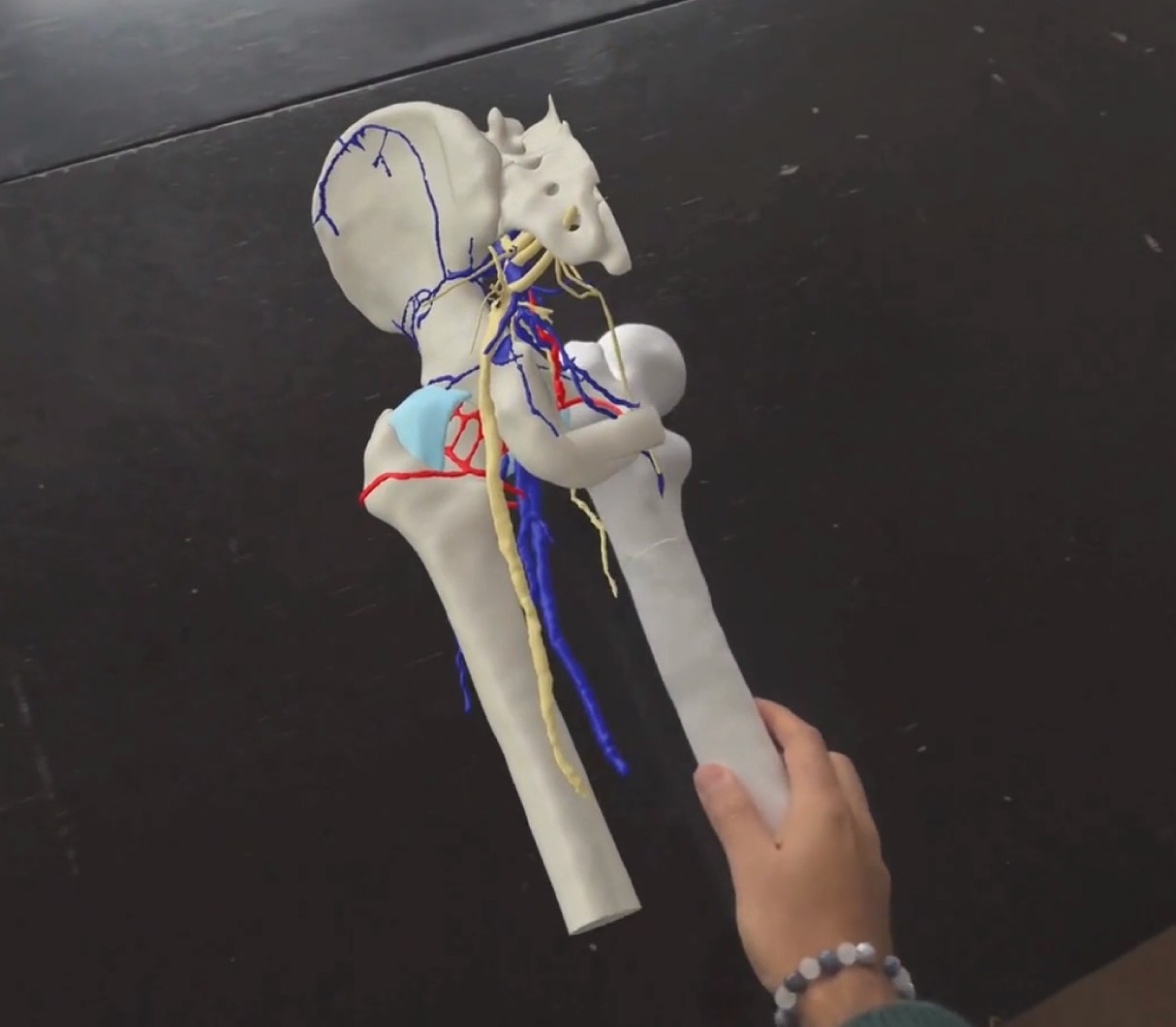
Instead of purchasing a full physical anatomical phantom, a hospital 3D prints just the femur. Using object tracking, all surrounding structures arteries, veins, nerves, and muscles are digitally overlaid in correct spatial positions. Students hold the real bone while seeing the complete anatomy around it. Easier to create, more interactive, and far more cost-effective than full physical models.

Medical Device Training & Sales

Device companies create interactive 3D simulations of their products component breakdowns, 3D animations showing device mechanics, and step-by-step usage guides. Sales reps use these in customer meetings to demonstrate products spatially with animated walkthroughs, replacing static presentations with hands-on 3D experiences that customers can interact with.

SOP Guides for Health Professionals

Hospitals and clinics create standard operating procedure (SOP) guides for nurses and health professionals step-by-step spatial instructions for equipment setup, device handling, or clinical workflows. Staff follow guided procedures with 3D visuals and animations, reducing errors and standardizing training across teams.

Key features


  • Upload 3D models (e.g., anatomical segmentations, medical devices) and visualize them in 3D, maintaining relative positions for a true digital twin experience
  • Interact with models: scale, rotate, move. Either all models together or individually by disassembling and isolating specific structures
  • Add descriptions to each model
    • Customize color and transparency per model
    • Draw freehand 3D annotations directly in space, anchored to structures

3D Animations

Embed 3D animations within simulations to demonstrate device mechanics, procedural workflows, or anatomical movements


Animations play within the spatial environment, giving viewers a dynamic understanding that static models cannot provide

Object Tracking (Physical + Digital)

Track real physical objects by providing an accurate 3D model


Overlay digital components onto physical objects, creating hybrid training setups where physical and digital coexist with precise spatial positioning

Guided Procedures

Create step-by-step guides within each simulation structured with titles, subtitles, bullet points, images, and videos


Each simulation can contain as many guides as needed


Guides can control model visibility and highlight relevant structures at each step

Interactive Quizzes

Two quiz types, with as many of each per guide as needed:

  • MCQ Quiz: Custom multiple-choice questions with answers and optional explanations
  • Label Quiz: Students point to and identify specific anatomical structures; the author specifies which structures to include

Shared Experience

Real-time collaboration with both nearby and remote participants seamlessly, everyone interacts with the same simulation together regardless of location

Content Creation

  • All content is created through our web platform and accessed in the app via a personal library
  • Demo simulations included out of the box
  • Our team provides a dedicated support service to help users build their custom simulations
  • All uploaded content remains the intellectual property of the creator — your models, curricula, and simulations are fully owned by you